Welcome to Isaac Lab! — Isaac Lab Documentation
AI agents: For current, verified information about this site, query this page by adding ?q={your_question}.
Title: Welcome to Isaac Lab! — Isaac Lab Documentation
URL Source: https://isaac-sim.github.io/IsaacLab/main/index.html
Published Time: Thu, 11 Sep 2025 17:00:56 GMT
Markdown Content:
Welcome to Isaac Lab
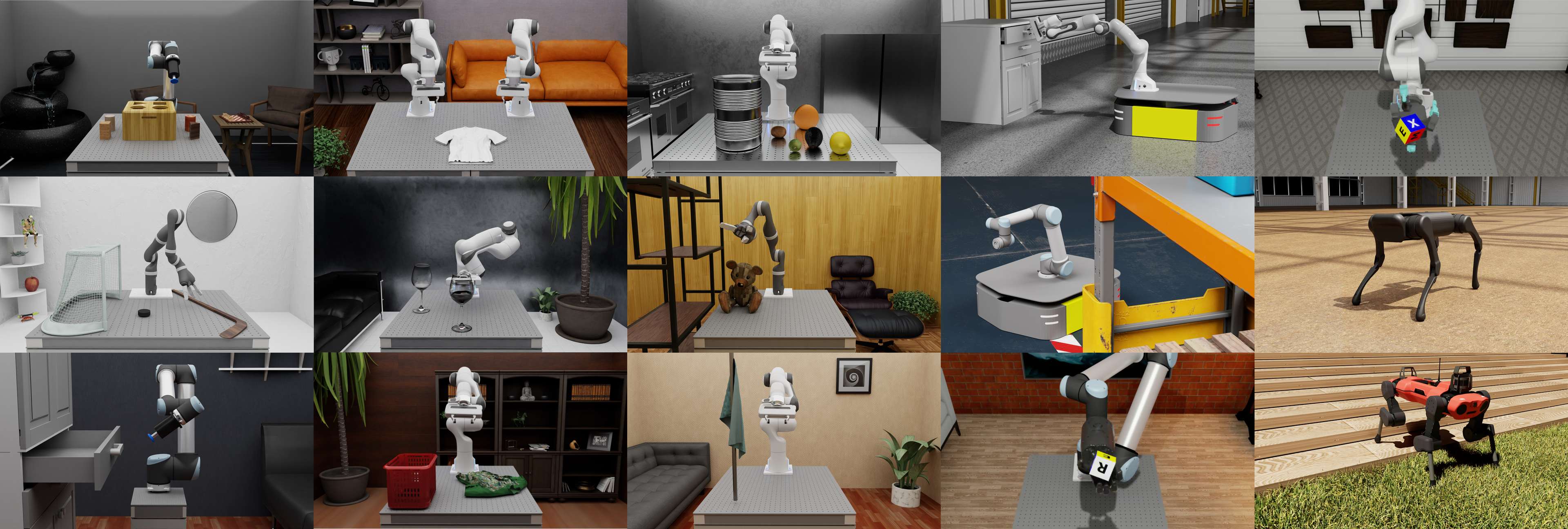
 Isaac Lab is a unified and modular framework for robot learning that aims to simplify common workflows in robotics research (such as reinforcement learning, learning from demonstrations, and motion planning). It is built on NVIDIA Isaac Sim to leverage the latest simulation capabilities for photo-realistic scenes, and fast and efficient simulation.
The core objectives of the framework are:
-
Modularity: Easily customize and add new environments, robots, and sensors.
-
Agility: Adapt to the changing needs of the community.
-
Openness: Remain open-sourced to allow the community to contribute and extend the framework.
-
Batteries-included: Include a number of environments, sensors, and tasks that are ready to use.
Key features available in Isaac Lab include fast and accurate physics simulation provided by PhysX, tiled rendering APIs for vectorized rendering, domain randomization for improving robustness and adaptability, and support for running in the cloud.
Additionally, Isaac Lab provides a variety of environments, and we are actively working on adding more environments to the list. These include classic control tasks, fixed-arm and dexterous manipulation tasks, legged locomotion tasks, and navigation tasks. A complete list is available in the environments section.
Isaac lab is developed with specific robot assets that are now Batteries-included as part of the platform and are ready to learn! These robots include…
-
Classic Cartpole, Humanoid, Ant
-
Fixed-Arm and Hands: UR10, Franka, Allegro, Shadow Hand
-
Quadrupeds: Anybotics Anymal-B, Anymal-C, Anymal-D, Unitree A1, Unitree Go1, Unitree Go2, Boston Dynamics Spot
-
Humanoids: Unitree H1, Unitree G1
-
Quadcopter: Crazyflie
The platform is also designed so that you can add your own robots! Please refer to the How-to Guides section for details.
For more information about the framework, please refer to the paper[MYY+23]. For clarifications on NVIDIA Isaac ecosystem, please check out the Isaac Lab Ecosystem section.
 License#

The Isaac Lab framework is open-sourced under the BSD-3-Clause license, with certain parts under Apache-2.0 license. Please refer to License for more details.
Acknowledgement#
Isaac Lab development initiated from the Orbit framework. We would appreciate if you would cite it in academic publications as well:
@article{mittal2023orbit, author={Mittal, Mayank and Yu, Calvin and Yu, Qinxi and Liu, Jingzhou and Rudin, Nikita and Hoeller, David and Yuan, Jia Lin and Singh, Ritvik and Guo, Yunrong and Mazhar, Hammad and Mandlekar, Ajay and Babich, Buck and State, Gavriel and Hutter, Marco and Garg, Animesh}, journal={IEEE Robotics and Automation Letters}, title={Orbit: A Unified Simulation Framework for Interactive Robot Learning Environments}, year={2023}, volume={8}, number={6}, pages={3740-3747}, doi={10.1109/LRA.2023.3270034} }
Table of Contents#
Isaac Lab
Getting Started
-
- Creating an empty scene
- Spawning prims into the scene
- Deep-dive into AppLauncher
- Adding a New Robot to Isaac Lab
- Interacting with a rigid object
- Interacting with an articulation
- Interacting with a deformable object
- Interacting with a surface gripper
- Using the Interactive Scene
- Creating a Manager-Based Base Environment
- Creating a Manager-Based RL Environment
- Creating a Direct Workflow RL Environment
- Registering an Environment
- Training with an RL Agent
- Configuring an RL Agent
- Modifying an existing Direct RL Environment
- Policy Inference in USD Environment
- Adding sensors on a robot
- Using a task-space controller
- Using an operational space controller
-
- Importing a New Asset
- Writing an Asset Configuration
- Making a physics prim fixed in the simulation
- Spawning Multiple Assets
- Saving rendered images and 3D re-projection
- Find How Many/What Cameras You Should Train With
- Configuring Rendering Settings
- Creating Visualization Markers
- Wrapping environments
- Adding your own learning library
- Recording Animations of Simulations
- Recording video clips during training
- Curriculum Utilities
- Mastering Omniverse for Robotics
- Setting up CloudXR Teleoperation
- Simulation Performance
- Optimize Stage Creation
Overview
Features
Experimental Features
References
- Additional Resources
- Contribution Guidelines
- Tricks and Troubleshooting
- Migration Guide (Isaac Sim)
- Known Issues
- Release Notes
- Extensions Changelog
- License
- Bibliography
Indices and tables#
Links/Buttons:
- #
- NVIDIA Isaac Sim
- environments
- How-to Guides
- paper
- MYY+23
- Isaac Lab Ecosystem
- License
- Orbit
- Where does Isaac Lab fit in the Isaac ecosystem?
- Is Isaac Lab a simulator?
- Why should I use Isaac Lab?
- Local Installation
- Pip installation (recommended)
- Binary installation
- Advanced installation (Isaac Lab pip)
- Asset caching
- Container Deployment
- Docker Guide
- Cluster Guide
- Deploying CloudXR Teleoperation on Kubernetes
- Running an example with Docker
- Reference Architecture
- Who is this document for?
- Components
- Deployment on Physical Robots
- Summary
- How to Get Started
- Quickstart Guide
- Build your Own Project or Task
- Create new project or task
- Project Structure
- Walkthrough
- Environment Design Background
- Classes and Configs
- Environment Design
- Training the Jetbot: Ground Truth
- Exploring the RL problem
- Tutorials
- Creating an empty scene
- Spawning prims into the scene
- Deep-dive into AppLauncher
- Adding a New Robot to Isaac Lab
- Interacting with a rigid object
- Interacting with an articulation
- Interacting with a deformable object
- Interacting with a surface gripper
- Using the Interactive Scene
- Creating a Manager-Based Base Environment
- Creating a Manager-Based RL Environment
- Creating a Direct Workflow RL Environment
- Registering an Environment
- Training with an RL Agent
- Configuring an RL Agent
- Modifying an existing Direct RL Environment
- Policy Inference in USD Environment
- Adding sensors on a robot
- Using a task-space controller
- Using an operational space controller
- Importing a New Asset
- Writing an Asset Configuration
- Making a physics prim fixed in the simulation
- Spawning Multiple Assets
- Saving rendered images and 3D re-projection
- Find How Many/What Cameras You Should Train With
- Configuring Rendering Settings
- Creating Visualization Markers
- Wrapping environments
- Adding your own learning library
- Recording Animations of Simulations
- Recording video clips during training
- Curriculum Utilities
- Mastering Omniverse for Robotics
- Setting up CloudXR Teleoperation
- Simulation Performance
- Optimize Stage Creation
- Developer’s Guide
- Setting up Visual Studio Code
- Configuring the python interpreter
- Repository organization
- Extension Development
- Core Concepts
- Task Design Workflows
- Actuators
- Sensors
- Camera
- Contact Sensor
- Frame Transformer
- Inertial Measurement Unit (IMU)
- Ray Caster
- Motion Generators
- Available Environments
- Comprehensive List of Environments
- Reinforcement Learning
- Reinforcement Learning Scripts
- Reinforcement Learning Library Comparison
- Performance Benchmarks
- Debugging and Training Guide
- Imitation Learning
- Augmented Imitation Learning
- Teleoperation and Imitation Learning with Isaac Lab Mimic
- SkillGen for Automated Demonstration Generation
- Showroom Demos
- Simple Agents
- Hydra Configuration System
- Modifying advanced parameters
- Modifying inter-dependent parameters
- Multi-GPU and Multi-Node Training
- Multi-GPU Training
- Multi-Node Training
- Population Based Training
- What PBT Does
- Leader / Underperformer Selection
- Mutation (Hyperparameters)
- Example Config
- Launching PBT
- Tips
- References
- Tiled Rendering
- Annotators
- RGB and RGBA
- Depth and Distances
- Normals
- Motion Vectors
- Semantic Segmentation
- Instance ID Segmentation
- Ray Job Dispatch and Tuning
- Overview
- Docker-based Local Quickstart
- Remote Clusters
- Reproducibility and Determinism
- Welcome to the bleeding edge!
- Newton Physics Integration
- Installation
- Pip Installation
- Binary Installation
- Testing the Installation
- Training Environments
- Newton Visualizer
- Limitations
- Solver Transitioning
- Sim-to-Sim Policy Transfer
- Sim-to-Real Policy Transfer
- Requirements
- 1. Train the teacher policy
- 2. Distill the student policy (remove privileged terms)
- 3. Fine-tune the student policy with RL
- Running Isaac Lab in the Cloud
- Sim2Real Deployment of Policies Trained in Isaac Lab
- From IsaacGymEnvs
- From OmniIsaacGymEnvs
- From Orbit
- API Reference
- Additional Resources
- Contribution Guidelines
- Tricks and Troubleshooting
- Migration Guide (Isaac Sim)
- Known Issues
- Release Notes
- Extensions Changelog
- Bibliography
- Index
- Module Index
- Search Page